Basketball Scoreboard Online
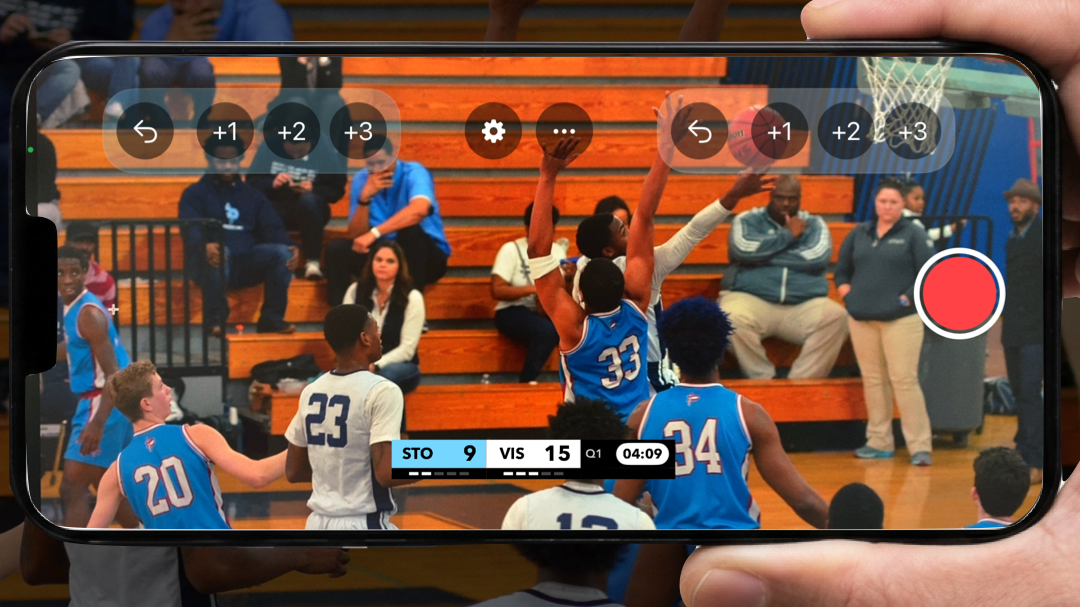
A basketball scoreboard that doesn't just count points — it puts them on your broadcast, automatically. ScoreCastPro pairs live scoring with broadcast-style graphics, so the score you tap on your phone appears on your stream in real time. Built for coaches, parents, volunteers, and club media crews who want a professional look without professional gear. Free to download, free to start.
In Short
ScoreCastPro is a basketball scoreboard that's also a broadcast studio — built into one app.
- Score on screen, automatically. Tap the score and the graphic updates on your stream instantly — no separate overlay software.
- AI can read the score for you. Point a second phone at the physical scoreboard, and Auto Score Sync updates the score automatically — no manual entry needed.
- Free to start. Download and run your first game free.
- One operator. If you can tap a screen, you can run it.
Local games, pro graphics. That's the promise — and it starts with one download.
A Basketball Scoreboard That Broadcasts Itself
Most scoreboard tools stop at the score. This one lives inside the stream.
A generic online basketball scoreboard gives you a number in a browser tab — then the hard part begins. Wire it into separate streaming software as a browser source, hope the transparency holds, hope nothing crashes mid-game.
Why juggle two tools when one does both? ScoreCastPro isn't a scoreboard you bolt onto a broadcast setup. It's a broadcast app with the basketball scoreboard already built in.
- Automated graphics. Score, quarter, and shot clock appear as broadcast-style graphics the moment you update them.
- One device, one operator. Score from the phone that's filming — or hand scoring to a parent while you film.
- Transitions that look TV-worthy. Score animations and period-break transitions fire automatically.
- Highlights, handled. Key moments are clipped as they happen, ready to post before the players leave the court.
Auto Score Sync — Let AI Read the Board For You
The one feature no other basketball scoreboard tool has: AI that reads your gym's physical scoreboard.
Most amateur gyms already have a scoreboard on the wall — updated by hand, disconnected from whatever's filming the game. Auto Score Sync closes that gap. Point a second iPhone (used as a remote) at the physical scoreboard, and the app reads the score, clock, and fouls directly off it — no manual entry, no second person typing numbers into an app while trying to follow the game.
[Visuel : le split-screen avec le cadre vert de détection sur le tableau physique, comme utilisé dans le Reel Auto Score Sync]
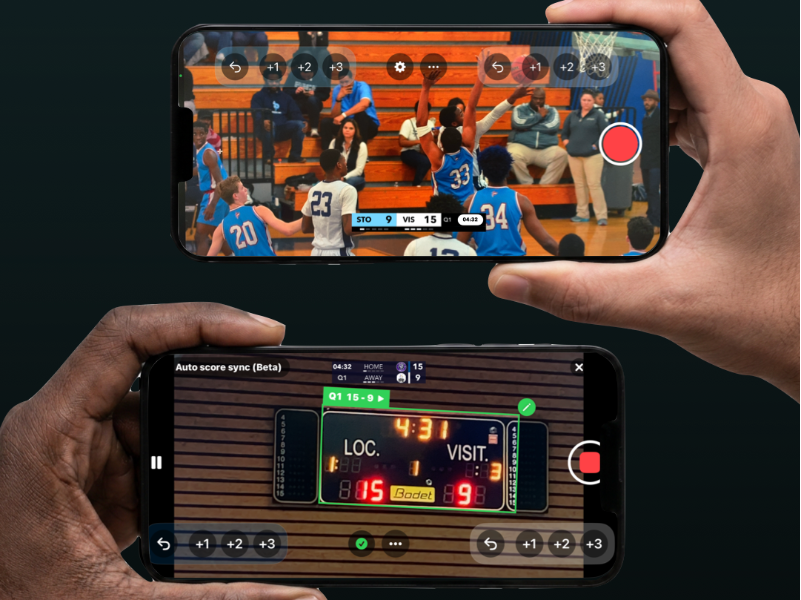
You're always in control — correct any reading manually at any time. It's AI-assisted, human-controlled, not AI-only.
Currently in Beta for basketball, and already used in real games — including a preseason tournament with four professional Elite 1 teams.
How It Works
Step 1 — Set up your game in under a minute
Choose basketball, type your team names, pick your colors. Your scoreboard loads instantly with quarters, shot clock, and fouls ready to go.
Step 2 — Go live and keep score
Point your phone at the court and press record. Every basket — a free throw, a two-pointer, a three — appears on the stream as an automated graphic. Or let Auto Score Sync read the physical board for you.
Step 3 — Share the stream, share the highlights
Stream to YouTube, Twitch, or any RTMP service. When the final buzzer sounds, your highlight reel is already built.
What You Get
- 🏀 Live score tracking — 1, 2, and 3-point shots, fouls, and quarters, all updated with a tap.
- 🤖 Auto Score Sync (AI) — read the physical scoreboard automatically, no manual entry.
- 📺 Automated graphics on the stream — no separate graphics software required.
- 📡 Stream to YouTube, Twitch, or any RTMP service.
- 🎛️ Remote control — a second iPhone becomes a wireless remote to update the score from the sideline.
- 🎨 Your branding — team names, colors, logos, and sponsor banners.
Trusted on Real Courts
Rangeman Films Media, a US sports media outlet covering high school and youth basketball, called ScoreCastPro "a great addition to our workflow" after using it during live coverage — highlighting how easy it is to operate while actually filming a game.
Basketball Scoreboard vs Broadcast Scoreboard
| What you get | Typical online basketball scoreboard tool | ScoreCastPro |
|---|---|---|
| Live score display | ✅ Yes | ✅ Yes |
| Graphics on the stream | ❌ Manual overlay setup | ✅ Built in and automatic |
| AI reads the physical scoreboard | ❌ Not available | ✅ Auto Score Sync (Beta) |
| Live broadcast included | ❌ Not included | ✅ YouTube, Twitch, or any RTMP service |
| Operators needed | 2+ (board + camera) | 1 |
| Highlight reel | ❌ Manual editing | ✅ Generated automatically |
| Cost to start | Free, with paid upgrades | Free, with paid upgrades |
Ready to Give Your Games a Pro Scoreboard?
Here's how it starts:
- ✅ Download ScoreCastPro — free, on the App Store (Android coming soon).
- ✅ Set teams, colors, and format in under a minute.
- ✅ Go live with automated score graphics — or let Auto Score Sync do the scoring for you.
- ✅ Share your highlight reel the moment the game ends.
Frequently Asked Questions
Is the basketball scoreboard free?
Yes. You can run the scoreboard and broadcast your first games for free, with no credit card required. The Pro plan unlocks Auto Score Sync, advanced branding, and animated scoring.
What is Auto Score Sync?
Auto Score Sync uses AI to read your gym's physical scoreboard — score, clock, and fouls — and updates your overlay automatically. You can always correct it manually.
Do I need a second phone for Auto Score Sync?
Yes. One iPhone films the game, and a second iPhone, used as a remote, is pointed at the physical scoreboard to read it.
Do I need special equipment?
No. ScoreCastPro runs on the iPhone you already have.
Can I customize team names and colors?
Yes. Set team names, colors, and logos in seconds and save them for the season.
Does it integrate with streaming?
Yes — broadcast to YouTube, Twitch, or any RTMP service with the scoreboard graphics already on the video.
Is there a remote control option?
Yes. A second iPhone can scan a QR code and become a wireless remote.
Does it work on iPhone?
Yes, available on iPhone today, with Android coming soon.